Intel Edison - DFU Flashing Issues
Intel Edison
Problems with DFU flashing the Intel Edison
Have you tried to upload the ubilinux distro to your Edison?
Do you get the annoying error on your mac/linux machine “Unable to allocate file buffer for firmware” when you’re dfu-ing the image?
Or does the “Ten minute upload” become instantaneous, but the root image is your previous one?
Maybe it’s saying “Could not read file”?
That’s because your image exceeds the RAM in your machine, (or the limitations of your architecture if the image is more than 2Gb?).
Setting up automounting on the Raspberry PI
Post date: Sep 27, 2012 12:06:04 PM
So the non-optimised debian setup hasn’t been working for me, so I’m using the raspbian distro now.
So I’ll be using the udisks-glue package.
Just add a line with udisks-glue into /etc/rc.local just before the “exit 0” line.
Then edit /etc/udisks-glue.conf to look (something like) this:
--- Start File ---
filter disks {
    optical = false
    partition_table = false
    usage = filesystem
}
match disks {
    automount = true
    automount_options = { sync, noatime, "dmask=0", "fmask=0" }
}
filter optical {
   optical = true
   usage = filesystem
}
match optical {
   automount = true
   automount_options = { ro, "mode=0444", "dmode=0555"  }
}
--- End File ---
Notes:
Plan 3.14159... (Raspberry Pi)
Post date: Sep 07, 2012 8:56:22 AM
Yes, the next bit of kit to try is the Raspberry PI.
I’m trying the “Softfloat” version of the Raspberry PI-based Debian installation.
Currently, I’ve installed usbmount (to mount the SD card when it appears on the usb bus) and usb-switcher to punt it into 3G mode.
So, it currently mounts, but that’s about it. I can’t seem to find the “cdc_ncm” but it according to /proc/config.gz as it’s compiled in statically …
More voodoo than what currently know about at the moment. The last linux kernel I compiled was a 2.4.xx ages ago.
OpenWRT (failed) recipe
Post date: Sep 03, 2012 6:42:17 PM
Here’s the recipe for the (failed) Open WRT project. Here for posterity.
start
(turn wifi off, set ip address to 192.168.1.2) telnet to 192.168.1.1
uci set network.lan.ipaddr=192.168.128.1
uci commit
reboot
(swap ip address to 192.168.128.2, enable proxy on 8888) telnet to 192.168.128.1
echo 'option http_proxy http://192.168.128.2:8888/' >> /etc/opkg.conf
opkg update
opkg install kmod-usb-storage block-mount usb-modeswitch-data kmod-scsi-generic kmod-fs-ext4
edit /etc/config/fstab (file contents)
config global automount
        option from_fstab 1
        option anon_mount 1

config global autoswap
        option from_fstab 1
        option anon_swap 0

config swap
         option device   /dev/sda1
         option enabled  1

config mount
         option target   /mnt/sda2
         option device   /dev/sda2
         option fstype   ext4
         option options  rw,sync
         option enabled  1
         option enabled_fsck 0

config mount
         option target   /mnt/sda3
         option device   /dev/sda3
         option fstype   ext4
         option options  rw,sync
         option enabled  1
         option enabled_fsck 0
(end file contents)
Joggler
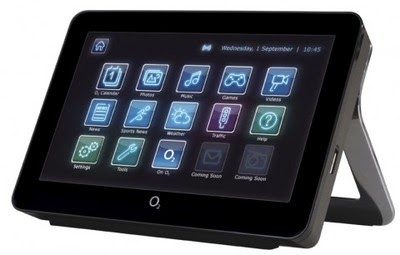
The joggler (aka O2 Joggler) wiki can be found here.
Currently running an Ubuntu image by exobuzz which can be found here. [maverick 1.9]
Car Based Joggler:
- Hands-Free Profile Support
- Heats ink Mod
- Motherboard Mods
- OBD II / Diagnostics
- 12V -> 5V 10A Converter
- 50W Audio Amplifier
TODO:
- [TODO] Media Playback (possible Moovida)
- [TODO] GPS
- [TODO] 12v -> 5V Vehicle PSU, possibly this adapter? this widget
- [TODO] Auto mute / pause media playback whilst in a call
- [TODO] Autoset “hciconfig hci0 scomtu 64:8”
- [TODO] Double DIN mounting, perhaps this one.
- [TODO] figure out the car stalk connector and map somehow to a usb HCI ?
- [TODO] OBDII readout.
Alas, this project has fallen off the world since I have changed cars and invested in an iPad Mini. So far it seems to have most features… pictures when I can get around to it.