Setting up automounting on the Raspberry PI
Post date: Sep 27, 2012 12:06:04 PM
So the non-optimised debian setup hasn’t been working for me, so I’m using the raspbian distro now.
So I’ll be using the udisks-glue package.
Just add a line with udisks-glue into /etc/rc.local just before the “exit 0” line.
Then edit /etc/udisks-glue.conf to look (something like) this:
--- Start File ---
filter disks {
    optical = false
    partition_table = false
    usage = filesystem
}
match disks {
    automount = true
    automount_options = { sync, noatime, "dmask=0", "fmask=0" }
}
filter optical {
   optical = true
   usage = filesystem
}
match optical {
   automount = true
   automount_options = { ro, "mode=0444", "dmode=0555"  }
}
--- End File ---
Notes:
Plan 3.14159... (Raspberry Pi)
Post date: Sep 07, 2012 8:56:22 AM
Yes, the next bit of kit to try is the Raspberry PI.
I’m trying the “Softfloat” version of the Raspberry PI-based Debian installation.
Currently, I’ve installed usbmount (to mount the SD card when it appears on the usb bus) and usb-switcher to punt it into 3G mode.
So, it currently mounts, but that’s about it. I can’t seem to find the “cdc_ncm” but it according to /proc/config.gz as it’s compiled in statically …
More voodoo than what currently know about at the moment. The last linux kernel I compiled was a 2.4.xx ages ago.
Plan B: MK802
Post date: Sep 07, 2012 8:32:34 AM
So I tried plan b earlier in the week.
If you follow the movements of tiny computing hardware, an embedded linux aficionado, or are just an Android fanboy, you’ll have heard of the “Android Powered Mini CPU for just $ 65” - the Rikomagic MK 802. Well, apparently it can run Linux, and there are a number of Ubuntu-based distributions for them. However, it’s all a bit rubbish – the Mali X drivers corrupt the displays on mine, and they seem to rapidly overheat.
OpenWRT (failed) recipe
Post date: Sep 03, 2012 6:42:17 PM
Here’s the recipe for the (failed) Open WRT project. Here for posterity.
start
(turn wifi off, set ip address to 192.168.1.2) telnet to 192.168.1.1
uci set network.lan.ipaddr=192.168.128.1
uci commit
reboot
(swap ip address to 192.168.128.2, enable proxy on 8888) telnet to 192.168.128.1
echo 'option http_proxy http://192.168.128.2:8888/' >> /etc/opkg.conf
opkg update
opkg install kmod-usb-storage block-mount usb-modeswitch-data kmod-scsi-generic kmod-fs-ext4
edit /etc/config/fstab (file contents)
config global automount
        option from_fstab 1
        option anon_mount 1

config global autoswap
        option from_fstab 1
        option anon_swap 0

config swap
         option device   /dev/sda1
         option enabled  1

config mount
         option target   /mnt/sda2
         option device   /dev/sda2
         option fstype   ext4
         option options  rw,sync
         option enabled  1
         option enabled_fsck 0

config mount
         option target   /mnt/sda3
         option device   /dev/sda3
         option fstype   ext4
         option options  rw,sync
         option enabled  1
         option enabled_fsck 0
(end file contents)
Step Two: Configure Router
Post date: Sep 03, 2012 4:02:35 PM
So why do we want to duplicate the functionality of the E355?
Well, it seems to be limited to five devices, as I mentioned in an earlier post that I have massive problems with that, I don’t want to have to juggle tech to some arbitrary limit. Also, I’d like to support more services at some point (media streaming perhaps)
Like all the 3G dongles I’ve seen recently, they initially show up as CD-Roms. Then the “drivers” switch them over to being the actual device. In this case a Micro SD Card reader and a USB CDC device, in this case a USB ethernet port.
Portable Hotspot
A long time ago, I was asked by a consultant friend of mine to have a think about being able to drop portable wireless internet repeaters. The brief was that first responders could drop a bunch of wireless mesh routers over the area so that computers could be used and contact base.
At the time the emergency department decided that it would be a luxury and unnecessary so I didn’t get to build a prototype.
Step One: Gather the Equipment
Post date: Sep 03, 2012 10:34:37 AM
First up, the battery pack.
The A10HZ from Maplin, a 5Ah 12v battery pack. This has 2x6v batteries internally, and a 200 W inverter, two accessory sockets, and two 12v terminal posts. It has a usb power socket and a light too, but the usb socket is tied to the inverter being on and the light is incredibly weedy, so we’re ignoring them for now.
Later this week...
Post date: Jul 10, 2012 9:48:30 AM
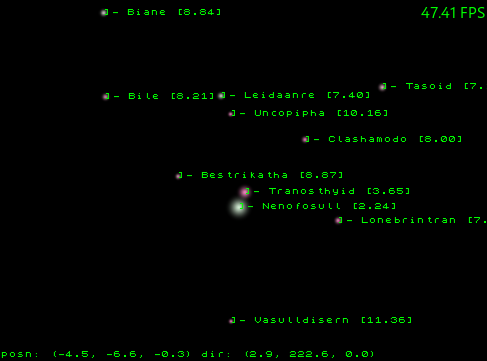
Later this week I should be releasing a web-player of an example star map that demonstrates a sector of the universe of planet101.
It’ll not be amazing in the first release, as you’ll be able to wander around a sector map looking at the star systems.
Here’s an example screenshot.
Ooops... I'm still working on it!
Post date: Apr 30, 2012 1:16:09 PM
Yes, umm … I am still working on planet101.
I’ve also cast aside some code that I’ve been getting annoyed with for now. Namely planet generation, I still have to sort all that out, but frankly, it’s rather a large chunk of code that can be replaced over and over. So back on the TODO pile it goes.
I’ve also noted that a couple of months after a friend tweeted about my p101 facebook page, notch announced that he’d like to do something similar. Thankfully, he appears to have got stuck into writing a virtual cpu so people can code in the game. I’m not sure if this has much to do with a ‘space game like elite done correctly’. Still, it irks me somewhat. If anything, it’s got me throwing more of my time and effort into this.
12/24V to 5V 10A Converter
Post date: Apr 18, 2012 10:04:15 AM
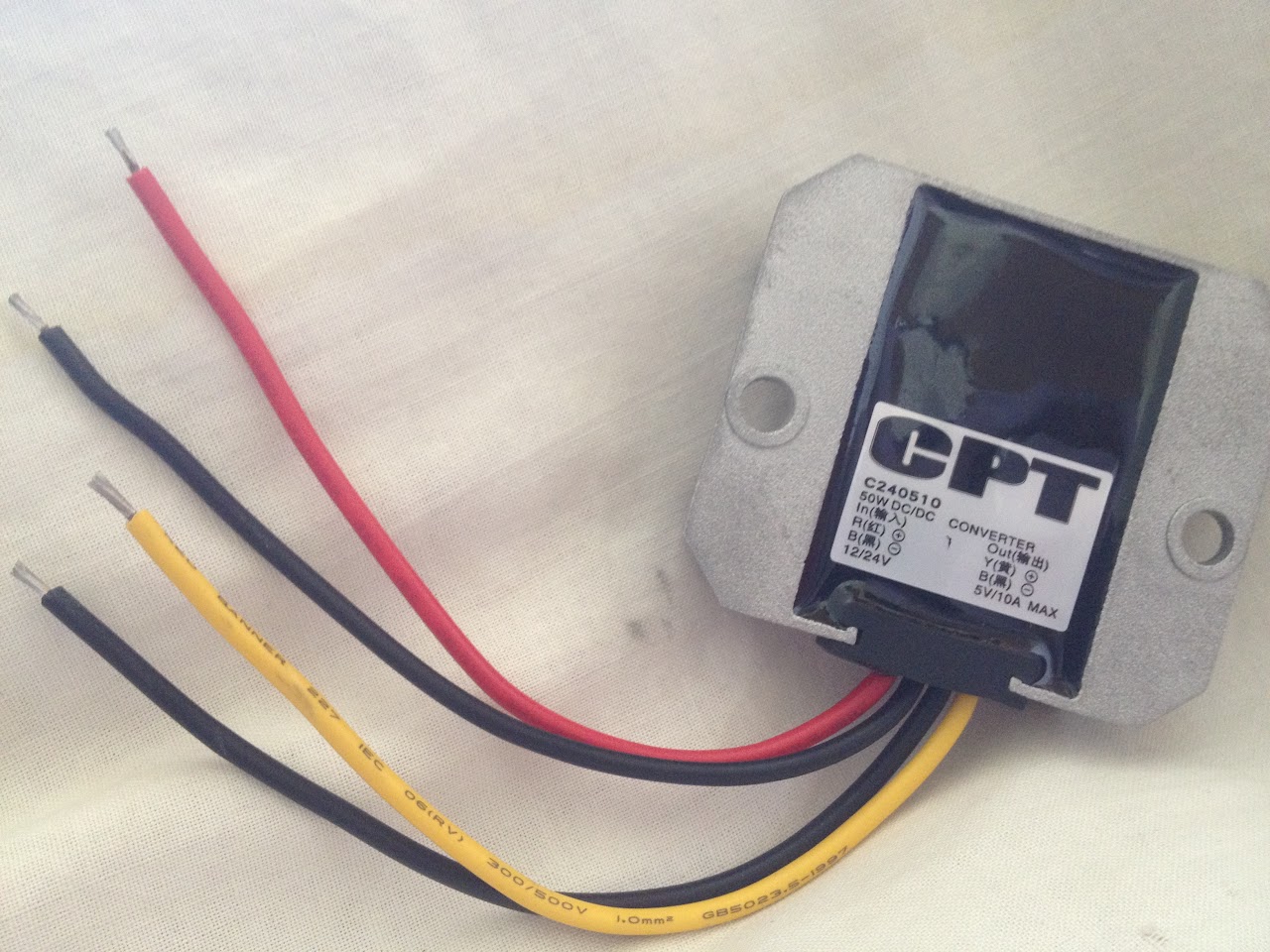
Ordered from DX.com it claims to supply up to 10A at 5V from a 12V source.
I’m looking forward to seeing if that is indeed the case :o)
As I ordered more than one, they’re going to be used for both the Joggler and Portable Hotspot projects.